AI Theme Generator
Project Overview
This project was a particularly interesting journey where I learned to push the limits of AI while navigating the constraints of NixOS, Unix sockets, and asynchronous processes. My goal was to build a full-color-theme switching backend for my Linux desktop environment.
To be clear, this wasn't about creating a fully deterministic automatic theme switcher. Instead, I was curious about two things:
- How well AI fares at determining cohesive color schemes.
- How to orchestrate color changes across all my local configurations simultaneously.
The Architecture: A Multifaceted Approach
I landed on a hybrid strategy. To control the actual theme switching, I relied heavily on shell scripts, using Quickshell to handle the user interface.
The Challenge of Static vs. Dynamic Apps
One of the biggest hurdles was managing the varying ways applications handle configuration changes. I began to notice which applications were built with dynamic reloading in mind and which were not:
- The "Impure" Problem: My notification system, Mako, cannot change color themes dynamically on the fly. It requires a physical configuration file and a reload signal. Since my configuration is managed via NixOS, this forced me into an "impure" setup to allow for real-time writes.
- The Socket Advantage: I gained a new appreciation for applications like Hyprland, Neovim, and Kitty. These tools use sockets or command-line interfaces to listen for requests. This is incredibly useful for maintaining a color palette that is rigid enough to stay consistent but flexible enough to change instantly without a restart.
UI Hurdles and Patching Thunar
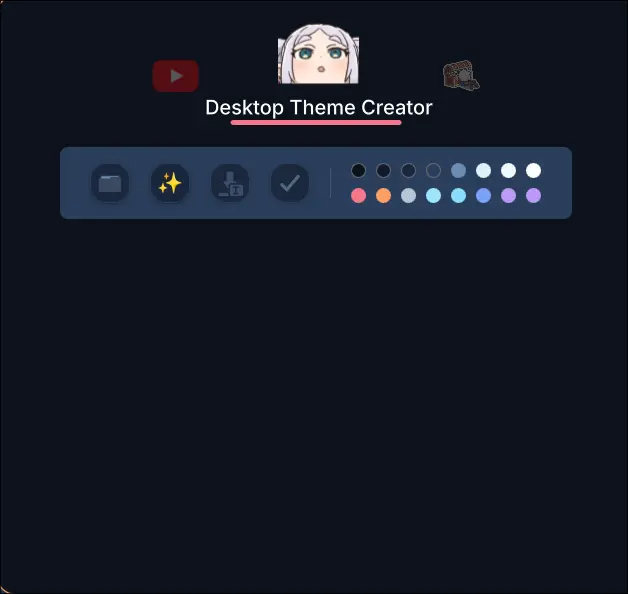
Setting up the Quickshell UI presented its own set of challenges. As seen in the video, the theme generation is a multi-step process that can take anywhere from 10 seconds to a full minute, depending on the image size.
Job Queuing
I encountered an annoyance where closing the Quickshell window would kill the active process. To fix this, I implemented a custom job queue within Quickshell to keep the process running in the background. This led to the "HOLD" mechanic you see on the buttons:
- Hold: Adds the task to the background queue.
- Click: Runs a regular version that cancels if the window is closed.
Pipe-Mode for File Selection
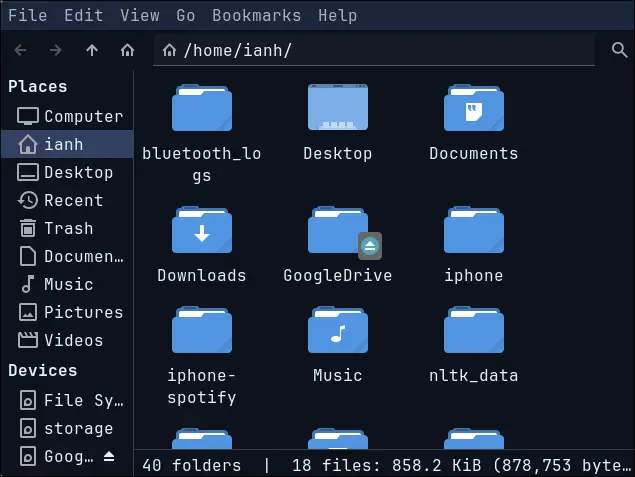
I also needed an intuitive way to pick images. After comparing options like Dolphin and Thunar, I chose Thunar for its aesthetics. However, I hit a snag: Thunar doesn't natively support piping a selected file path back to a calling process.
To solve this, I actually patched the project with a custom --pipe-mode flag. This allows Thunar to output the selected file path directly, which I then pipe into the AI agent for ingestion.
AI Integration: Gemini vs. Claude
I tested two different AI providers and found a significant difference in both quality and developer experience.
- Google Gemini: I found the setup cumbersome. I had to store images in Google Cloud blob storage, ask the AI to reference them, and then manually handle deletion after the palette was generated. Furthermore, the resulting themes didn't feel as cohesive.
- Claude: Claude felt much better at deciding color themes. The integration was simpler—I could just point it to a local folder.
Overcoming "Claude Code" Limitations
There were complications regarding file access. Claude's CLI typically requires manual approval for file access unless you use "dangerously experimental" flags. I bypassed this by dynamically injecting the exact image path at runtime to ensure the agent had immediate access without needing risky global permissions.
Refining the Palette with Rust and Quantette
Despite the AI's capabilities, I realized that LLMs still struggle to pick a truly balanced color theme from scratch. To make the process more deterministic, I integrated a Rust library called Quantette.
Quantette uses a k-means clustering algorithm to find the most dominant colors in an image. My final workflow looks like this:
- Quantette clusters the image into 30+ dominant colors.
- The AI then selects a Base16 (or Base24) palette from those specific clusters.
This hybrid approach resulted in much better themes, especially for palettes that aren't strictly black and white. Since Quantette wasn't available as a pre-compiled binary for my needs, I built it from source and integrated it directly into my Nix configuration.
Conclusion
After all that setup—from patching file managers to building Rust libraries into Nix—I finally have a working, intelligent color generator. It was both a fun technical challenge and a rewarding addition to my desktop workflow.